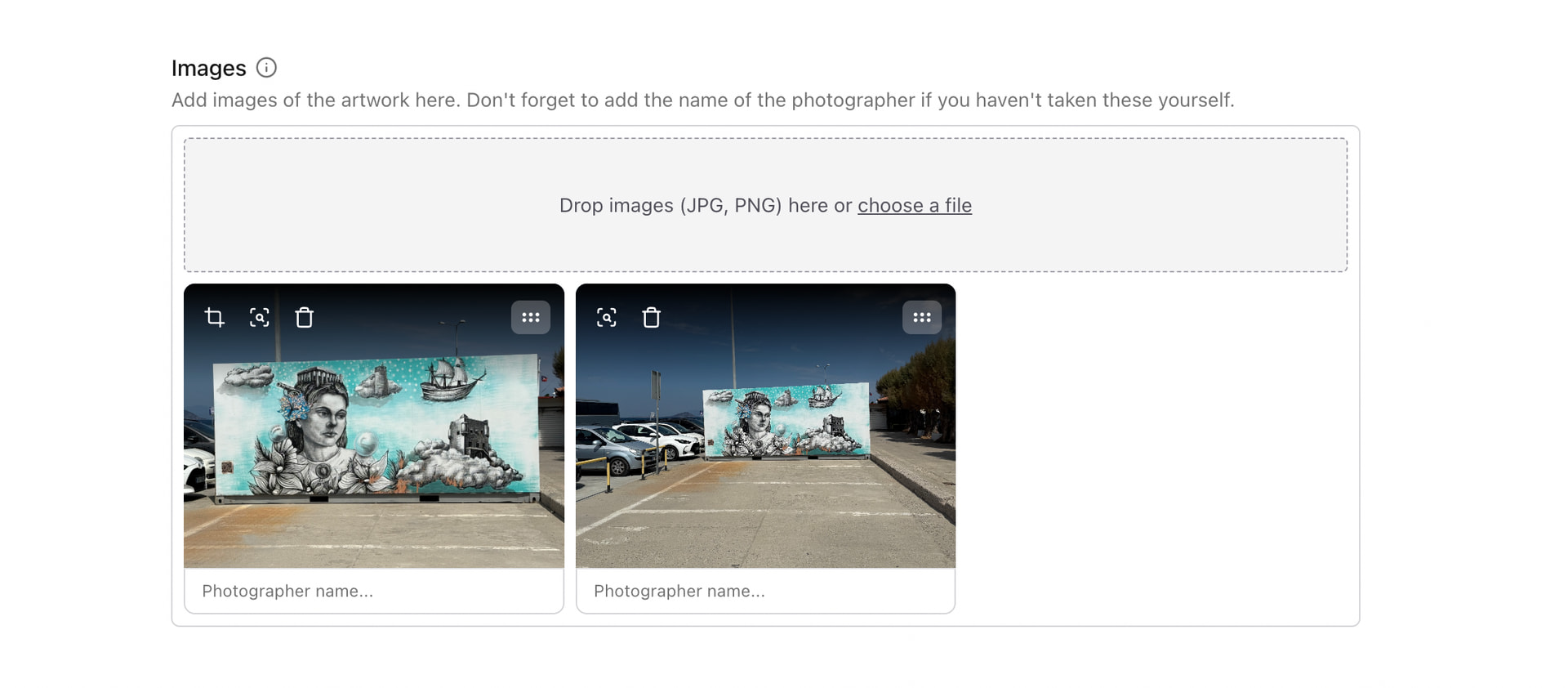
Hello, is there a way to change the order of the pictures in an artwork for a better frame (in case you have added more than one) , or is it just delete and upload again?
Thanks a lot
Hello, is there a way to change the order of the pictures in an artwork for a better frame (in case you have added more than one) , or is it just delete and upload again?
Thanks a lot
When editing the artwork you’ll notice there is a little icon on the picture that looks like three horizontal lines. Click and drag on this icon and drag the images into the order you want.
Thank you, Andrew, you just saved me a lot of work 
@Thomas This is a question what we get regularly.
We don’t want to get the picture field filled with many (big) symbols right. Maybe there could be another symbol which could be more user friendly? Just loudly thinking?
https://www.shutterstock.com/nl/image-vector/vector-shuffle-repeat-icon-symbol-set-157385084?dd_referrer=https%3A%2F%2Fwww.google.com%2F ?
I’ve just tried this on my tablet (viewing the edit page through my browser), but it’s not working. I can see the three lines though.
A double headed arrow, maybe? Three lines (to me, at least) is synonymous with the hamburger icon, which is usually for a menu
Yes, I just tried it on my iPad and can’t make it work either, I also then tried on my iPhone and get the same results as iPad, long-pressing the “hamburger” just brings up a context menu and you can’t move the pictures.
It works fine on my laptop / browser though.
Agree with Stef/Stephen that another icon would be better. On my laptop when you position the mouse pointer over the “hamburger” it changes to a “4-pointed arrow”, if this icon could be the one that shows it would make the function more obvious.
Je suis aussi d’accord sur le changement de symboles pour avoir eu le même problème 
Et je confirme aussi que cela fonctionne bien de l’ordinateur mais pas sur le téléphone
Same here, it works on my laptop not on my phone
Thanks guys, good input. I’ve just released a new version of the image editor that uses a slightly clearer icon (I want to stay away from using custom icons - drag handles usually either have a hamburger icon or a dots grid icon), makes dragging a bit smoother, and hopefully should work on more mobile devices.