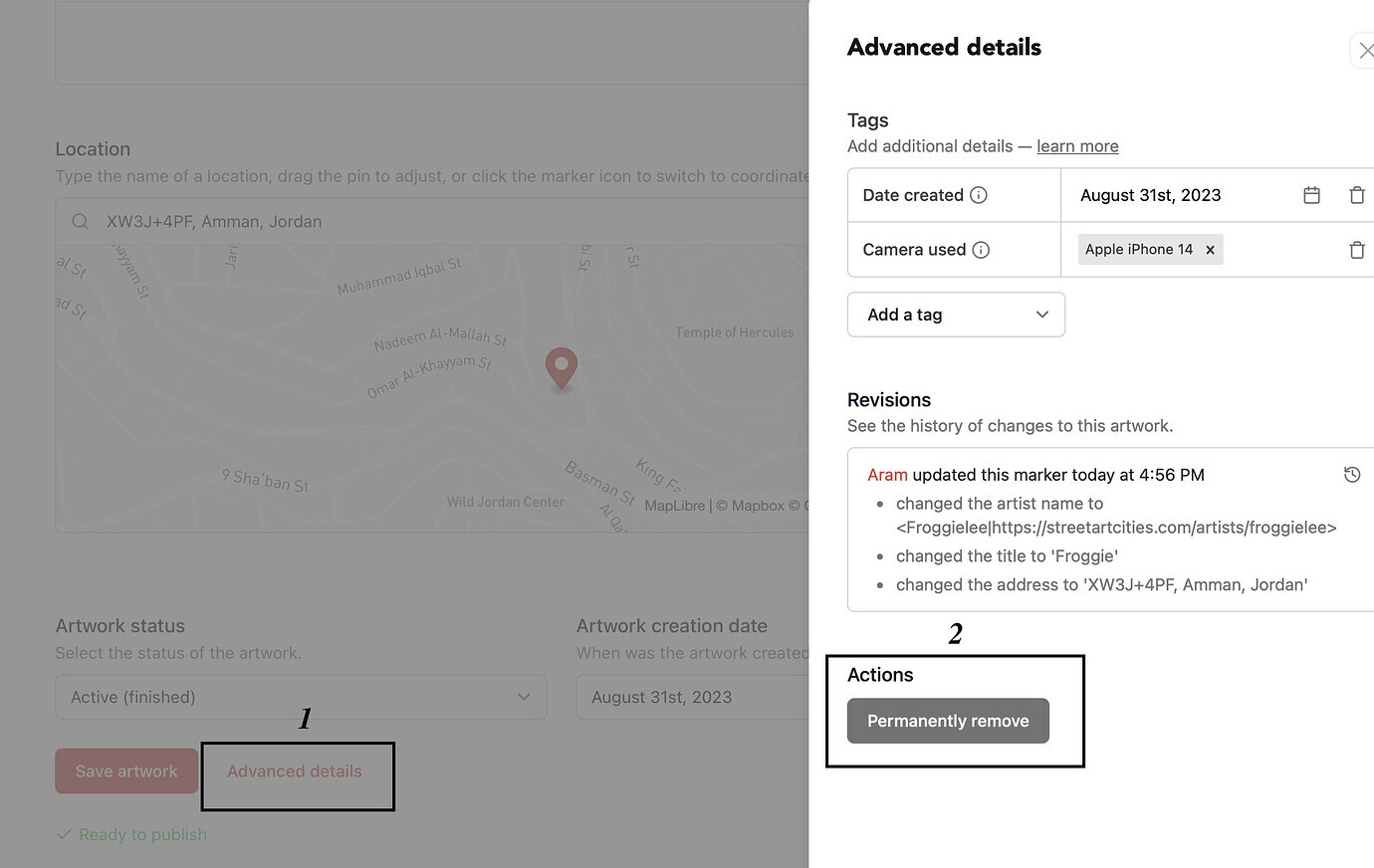
Accidentally uploaded the same artwork twice or did you made an error? No stress, you can remove the extra one yourself in just a few clicks. Here’s the quick fix for anyone running into this.
Step‑by‑step
Open the artwork: go to the duplicate entry you want to remove.
Go to Advanced Details: you’ll find this option in the artwork menu.
When the pop‑up appears, click Permanently Remove: this will delete the artwork from the platform for good. This will be irreversible n contrary to the ‘archive’ feature.
May I make a suggestion? When you go into Advanced Details, the Permanently Remove button is the most prominent feature on it, and where your eye (and finger) is naturally drawn to for closing that pop up. The method for closing it for all other instances is a very small X in the top right of the screen.
I have nearly pressed that button on too many occasions, and I am worried that I might one day accidentally use it without thinking. I know there is a double-check before deleting it, but I’d still rather not reach that point.
Could you please make that less distinctive to press, and “big up” the way the vast majority of people will want to close that pop up?
The X is a standard pattern for this type of dialog window, and you can click next to it (most of the screen - most users use this interface on PC, rather than mobile) to dismiss it, so I’m reluctant to make it something more custom.
You’re not saving any data on this screen, so I wouldn’t really like to give that impression by adding a save button or any additional UI elements that clutter up the experience. Hope that makes sense!
When we use the advanced marker to add information, like Previously On this Wall, or event links, doesn’t that count as saving data?
I know I’m being incredibly pedantic, but the very first time I used that feature, it felt so much like I was closing without saving. There was no feedback from my input to indicate what I had done had changed anything.
Even now, whenever I close it, I still have a tiny doubt that it hasn’t worked.
I understand from what you’re saying that that any form of visual feedback is unnecessary, but without it, it just feels… wrong. Is introducing some feedback, or adding a save button that functions the same as the X, or maybe even some reassuring text to say “closing this window/pop-up automatically saves your changes” going to cause issues?
If it does, then fair enough, don’t change it. But if it doesn’t, surely it could be classed as an improvement to help new users with your UI?
My apologies for keeping on going over and over this, but I do think this change would be an improvement.
I see what you mean, but nothing gets saved until you press ‘Save’ in the main screen.
We’re working on a new editing experience where you can edit an artwork directly from the website and app, and I’ll definitely take this into account - I agree having this whole side panel is quite confusing anyways, especially on mobile.