Hello from Paris!

I joined the Hunter community for Paris earlier this year, but I never took the time to introduce myself.

I’ve been interested in street art, especially murals, for a long time, but I knew very little about the scene itself.

Last year, I started a challenge to collect all the Space Invaders in Paris. Along the way, I took photos of many paste-ups, mosaics, and other street art pieces I found nearby.

As my collection grew, I became curious about those other artworks and wanted to identify the artists behind them. That’s when I discovered Street Art Cities, which turned out to be an incredibly helpful resource for finding artists and learning more about their work.

I soon started contributing to the site and, like many beginners, made a few mistakes: incorrect artist attributions, poor photos, inaccurate GPS locations, and duplicate posts. Fortunately, many of those were spotted and corrected by more experienced hunters.

To reduce mistakes and speed up the tagging process, I developed a tool to help me manage and organize my photos. It can group artworks into clusters, correct GPS drift, identify artists from known catalogs and maps, and check for possible duplicates on SAC using artist names, nearby locations, and image comparison. It has helped me significantly improve the quality and accuracy of my contributions. (i started with DigiKam for tagging, but then found that a custom tool was more suitable)

Hopefully, some of the features I’m using today will eventually find their way into the Hunter Dashboard. The duplicate finder alone is a huge time saver.

If the SAC team ever visits Paris, I’d be happy to give a demo and share what I’ve learned.

5 Likes

Hi Typlan,

Welcome to the group! The first time I came across Invader’s mosaics was also years ago while visiting Paris—unfortunately, back then I didn’t actually bother to download the app and hunt them down!

Building a custom tool to handle GPS drift, duplicate detection, and photo organization is really impressive. I’d be very curious to hear how it works under the hood. If it’s open-source or on GitHub, I’d love to check it out and test it as well!

Cheers!

1 Like

i installed the invader app very late (i was against geo tracking), but the oldest photo i have of an Invader are from 2006 :slight_smile: (the app started in 2014).

so far the tool i use is tailored for my use, on Paris and works only on my PC, but i plan to share experience, findings, specifications - (i can’t share the private github as-is as it needs cleanup and likely contains personal data)

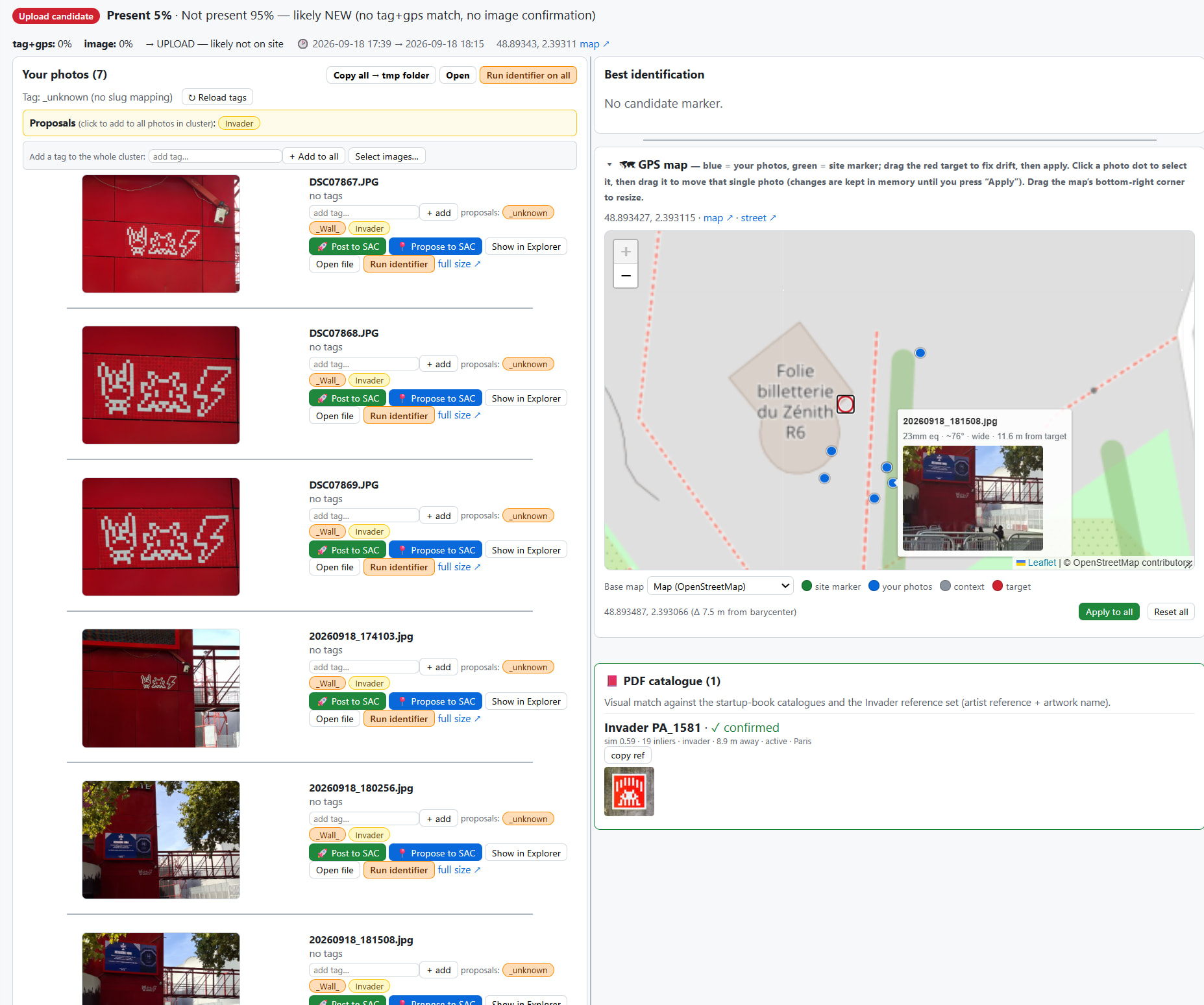
here’s a glimpse at how it looks at the moment:

it’s a serie of python scripts that first detects images that misses GPS coords (it often happen with my camera) and then apply coordinates of photos taken in the same time period as quick fix. (it also look for inconsistent ‘teleport’ jumps)

then the tool will group photos by ‘cluster’ based on how close they are in time, space, image similarity, (and artist name if they are tagged), so i have a view of all photos taken on a subject at once (see on the left, the 7 photos taken at the same place, at the same moment) , on the right is the position of each of them as bluee dots, that i can adjust manually and save in images meta-datas)

the output of the script is then shown as a web page:

the right side also checks in the location (about 100m around) what already exists on SAC and could be similar. (here it did not find anything)

i then label the photos with artist name (here Invader) and then rerun a second verification step that look for all pieces from this same artist in a wider range (as i noticed some pieces can be placed more than 100m away from their real location, when not manually repositioned)

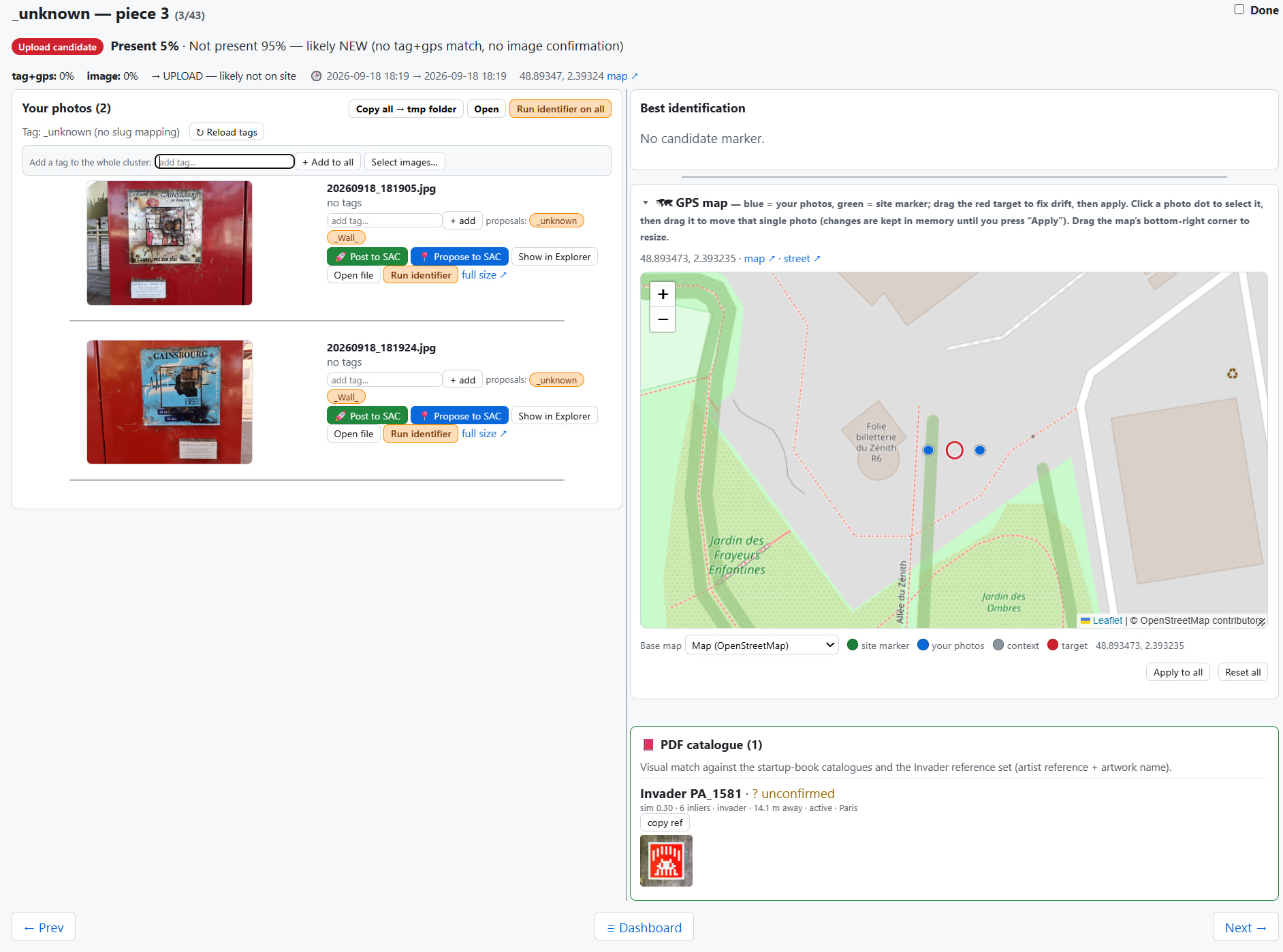
then second cluster, same place, but a bit later , and different photos:

(clustering is not always that good, i was lucky this time)

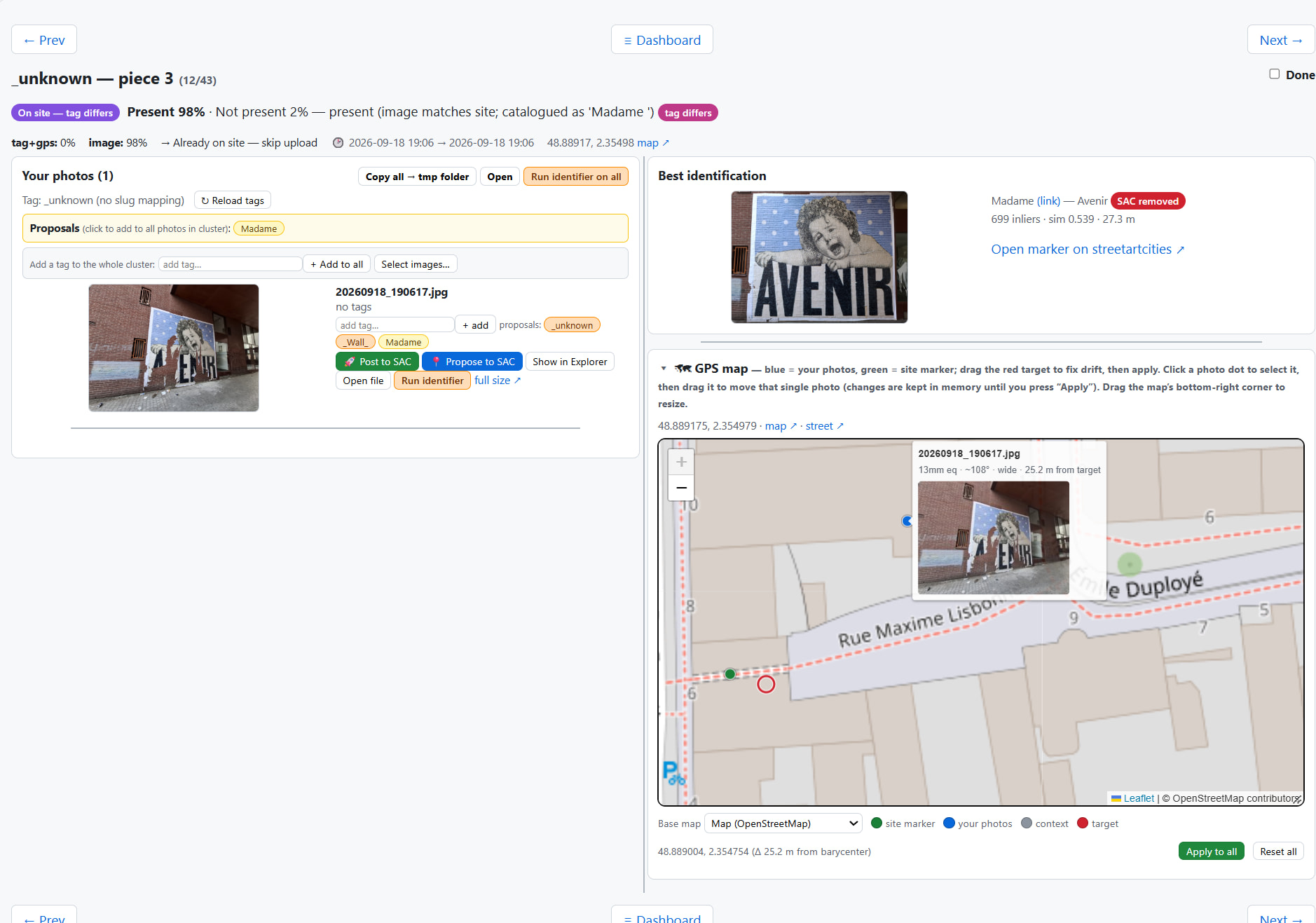
then here’s an example of a photo that found a match on SAC: (it was already posted, and was flagged as degraded, it’s visible top right)

on the map the red circle is the exact position of the piece, that i can manually set on my photos, where the green one is the SAC marker and the blue one is from the photo i took, drifted due to the GPS ‘urban canyon effect’.

this tool facilitates the ‘mass tagging’ so i can focus on correct the positioning of each piece with highest accuracy, usually i run this process just after my walk so all positions are still fresh in mind. i also take ‘context’ pictures with extra large angle to help me retrieve the exact positionning of small pieces. (the ‘open on street view’ button is also very helpfull to compare with my pics)

3 Likes

That is very cool, looks really interesting!

2 Likes

That is such a clever setup, Typlan!

Fixing GPS drift with nearby timestamps makes a lot of sense. Tall city buildings always mess up camera GPS signals. Expanding the search radius once you know the artist is really smart too, especially for catching older pins that were placed in the wrong spot. Thanks for sharing how it works :grinning_face:

2 Likes

i just created a ‘simplified’ public version on github so you can give a try:

cplanty/street-art-photo-assistant:
street art photo assistant - groups photos by clusters to ease tagging and GPS position fixing. interfaces with StreetArtCities website to match existing markers

3 Likes

Thanks. I will try it out when I get some free time :grinning_face:

Hey Typlan,
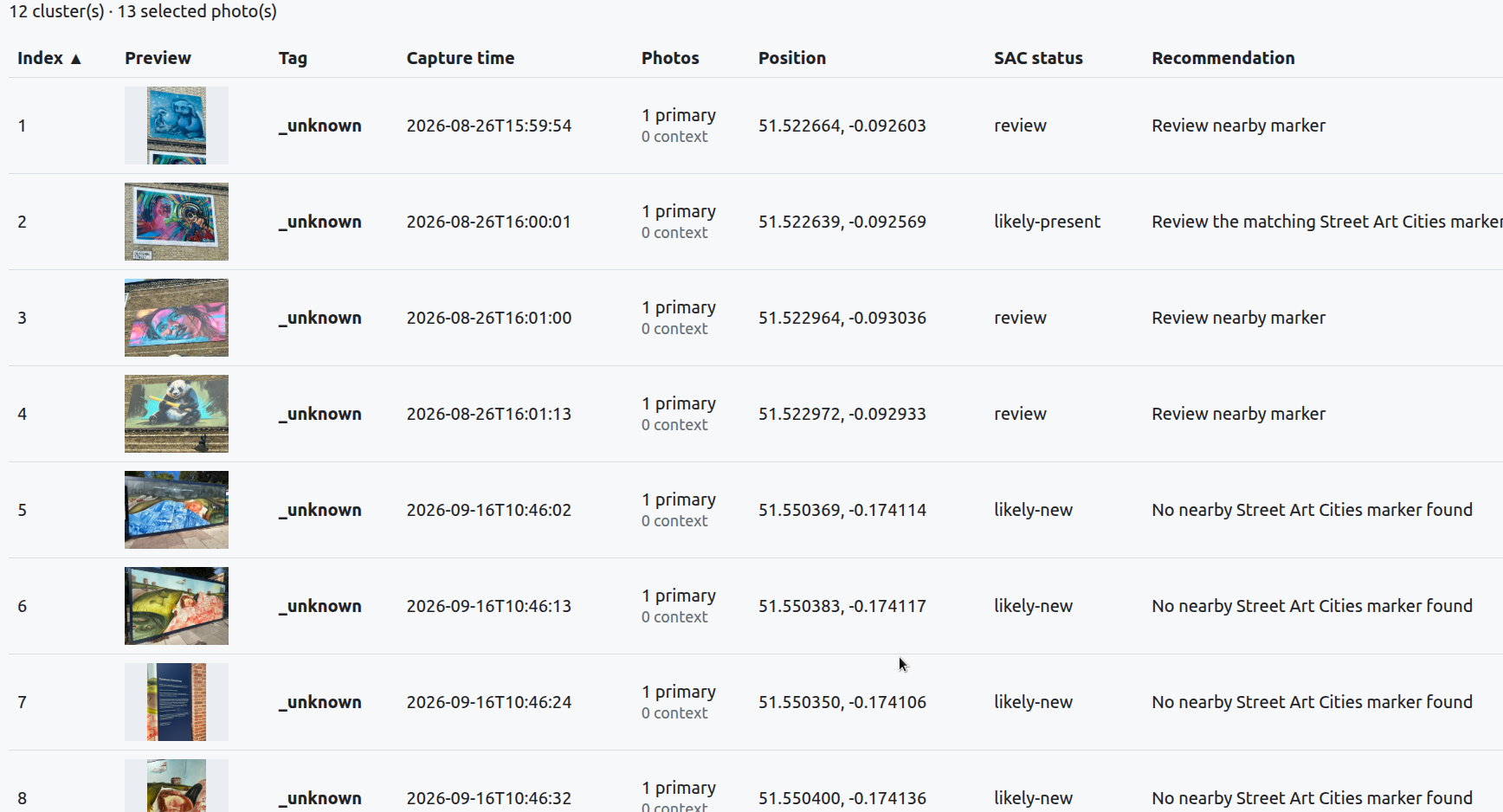
Your program is really cool. I tested it with 13 photos from @Lulo 's website, and it worked really well! Though all the ‘review’ items actually turned out to be ‘present’!" :wink:

3 Likes

nice ! thanks for testing.

i listed the main reasons for it to not work as expeted in docs/sac-integration.md

and added a small ‘daily workflow’ section in docs/workflows.md that describes how i use it.

hope that helps.

2 Likes

Hi Typlan,

Thanks for the docs—that definitely helps.

Clicking on a photo in the list to review nearby existing artworks on Street Art Cities worked seamlessly just like your guide, and every piece was listed accurately.
Really brilliant tool! :100:
This will save me so much time sorting out Lulo’s photos. Thanks again! :smiling_face_with_three_hearts:

2 Likes

So cool! If you want to integrate it deeper with SAC, I’ve been working on an external API that developers can integrate with: https://developers.streetartcities.com/

3 Likes

Thanks Thomas, i’ll have a look at the API.

Rimbo: i recommend that when adding a new tag, add it to the artists.csv file (with the SAC and instagram slug) so later when this tag displayed, you’ll get links to artist in SAC and instagram.
This is also the foundation of a ‘post to SAC’ feature, that can create (or propose) a new entry in SAC, upload photo, pre-written bio, tags, instagram link … in a single click (this exists only in my private version, i should rewrite it using the API).

2 Likes

Awesome! Let me know how you find it, happy to make changes to make it easier to use.

1 Like

i just pushed an update of the tool, thanks to Thomas support it now uses the API and is capable to submit proposals:

  • various UX improvements,

  • enhanced Street Art Cities matching

  • the ability to propose new artworks directly to SAC (including pending-approval tracking to prevent duplicate submissions)

The proposals are still bound to a city - either for the comparison of existing artwork and and also when it posts a proposal, the city parameter is required. (but i guess posting one city at a time is ok in most cases ?).

2 Likes