Hello! How do I delete a duplicate art object? One of them was added by mistake.
Hi @Odessit
Under the ‘Edit’ button one of the options should be “Merge into another marker”. Merging them together will usually be better than just deleting one of them, as it will make sure all the information is combined from both versions.
If anything doesn’t work with this, or is confusing, just let us know and we can look closer or talk you through in more detail.
Hello Tony!
Thanks for your prompt reply.
When I open Artworks, I can see only one added mural, so there is no duplicate there.
However, when I click on my icon in the upper-right corner, click the arrow next to my name, and select Edit History, I can see two added tags.
There is also only one tag displayed on the map.
Could you please check why two tags appear in my Edit History?
Hello Tony!
One question, which format of Lat. and Long., if no address of art-object? I tried 46.5496 30.7338, no success.
Thanks
Hi @Odessit
As far as I know a user’s Edit History is private, so I’m presuming only an administrator would be able to look yours. But Iif the same artwork appears twice there it would usually suggest you made two different changes to it: perhaps the first is you adding it, and then you edited it to change or add something? But as long as both edits link to the same artwork, and everything about that artwork looks line, I suspect there’s nothing to worry about.
You could also use the ‘View history’ on the artwork itself (under the three dots ‘…’ in the top right) to see if there are any clues there. (That one is public, so if you’re still uncertain, let us know which artwork you mean, and we’ll be able to check the history from that angle).
On Lat/Long that format should be fine. What happened when you tried to use that? Did you get an error message, or did it just silently fail? (And just to check, did you switch to ‘Coordinate mode’ first using the three dots at the right? I don’t think it’ll work if you just put the co-ordinates into the search box)
on page “Edit history”
Hi Tony.
On page “Edit history” Added mural “For friends”, and other with name artwork and description - address incorrect, geoposition: 46.5496 30.7338. When you open this tag - shows name “For friends”?
Address - I don’t know why the system identifies that address, it’s incorrect. Map shows correct psn, but no address there on Google maps. It’s an animal shelter.
I wanted put geoposition, I go to Coordinate mode, then enter lat / long, but msg - no variants, and info disappears.
I appreciate, if administrator delete which - with name artwork and description - address incorrect, geoposition: 46.5496 30.7338 on “Edit history” page. Thanks
I’m assuming you’re talking about For friends by Anastasia Belous - Street Art Cities . The location of it in the system is definitely the correct co-ordinates already (46.5496 30.7338), which is presumably why it won’t let you update them again (as there’s nothing to change).
So if that’s displaying the wrong street address, then I assume this must be a bug in whatever geocoding service is translating the co-ordinates, which I’m afraid isn’t something I know anything about. I suspect we need @thomas to step in here now…
Correct, there’s not really a way to independently define the address and the geolocation. You either enter the address and it automatically sets the geolocation, or you enter the geolocation and it will automatically set the address (in both cases uses Google Maps data).
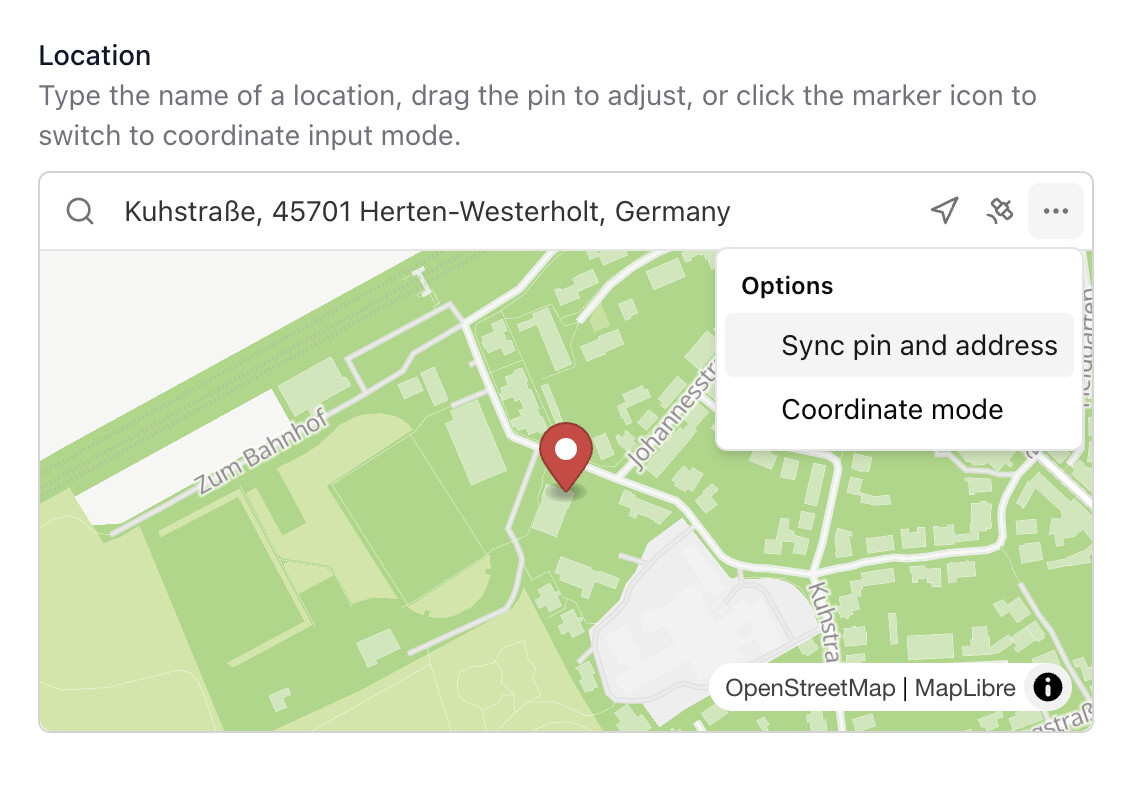
The closest you can get to this is manually entering the address, then unchecking the ‘Sync pin and address’ option and moving the map pin to a different place:
Hi Thomas.
Thank you for your clarification. I already understood, when entering geoposition, tag showing on map, but in line info disappears.
Have a good evening.