Some info on the growing number of community notes and how to handle them.
On the Street Art Cities app, Community Notes is the feature that turns street art hunting into a real community effort.
When you spot a mural on the map, you can do more than just admire it, you can interact with it. By tapping on a piece, you can mark it as:
- Seen – let others know it’s still there and in good condition.
- Removed – report if it’s sadly gone.
- Wrong location – help correct map errors.
- Vandalised – flag if the artwork has been damaged or tagged.
- Wrong artist – fix incorrect credits.
You can also leave a comment, whether it’s extra context, a fun fact about the artist, or tips on how to find the spot.
Every note helps keep the Street Art Cities database accurate and alive, making it easier for locals and visitors to discover street art in its true form. It’s a simple way to give back to the community while making sure the art and artists get the recognition they deserve.
But how to handle them? Like some of you already mentioned, it’s important to notify the person who left the note. Since there’s no technical solution for it yet, my suggestion is to copy them in the description of the artwork. Check this recent example below:
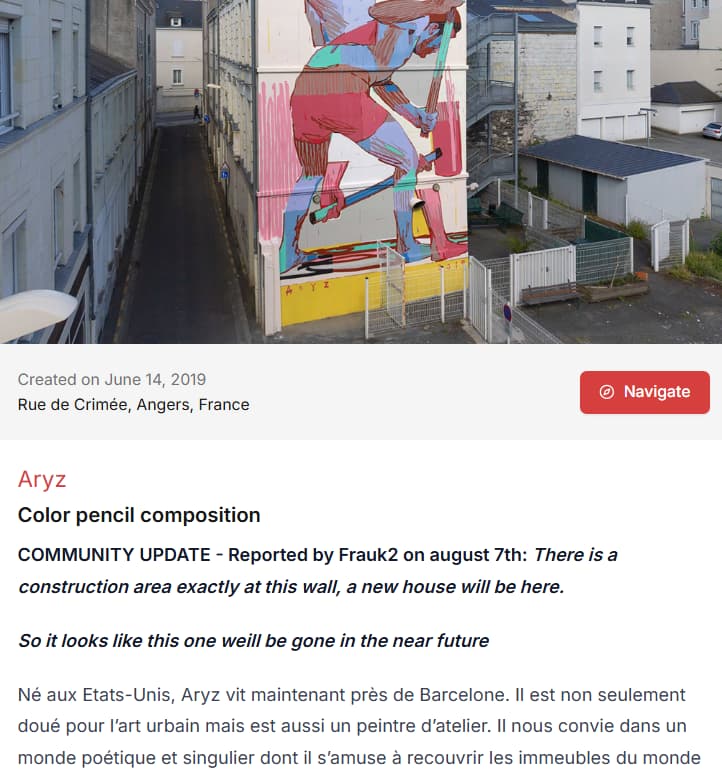
I deliberately added it at the top to inform the users directly, I copied the info from the community notes page on the dashboard.
Please let me hear your thoughts on this, so we can finetune this together.